

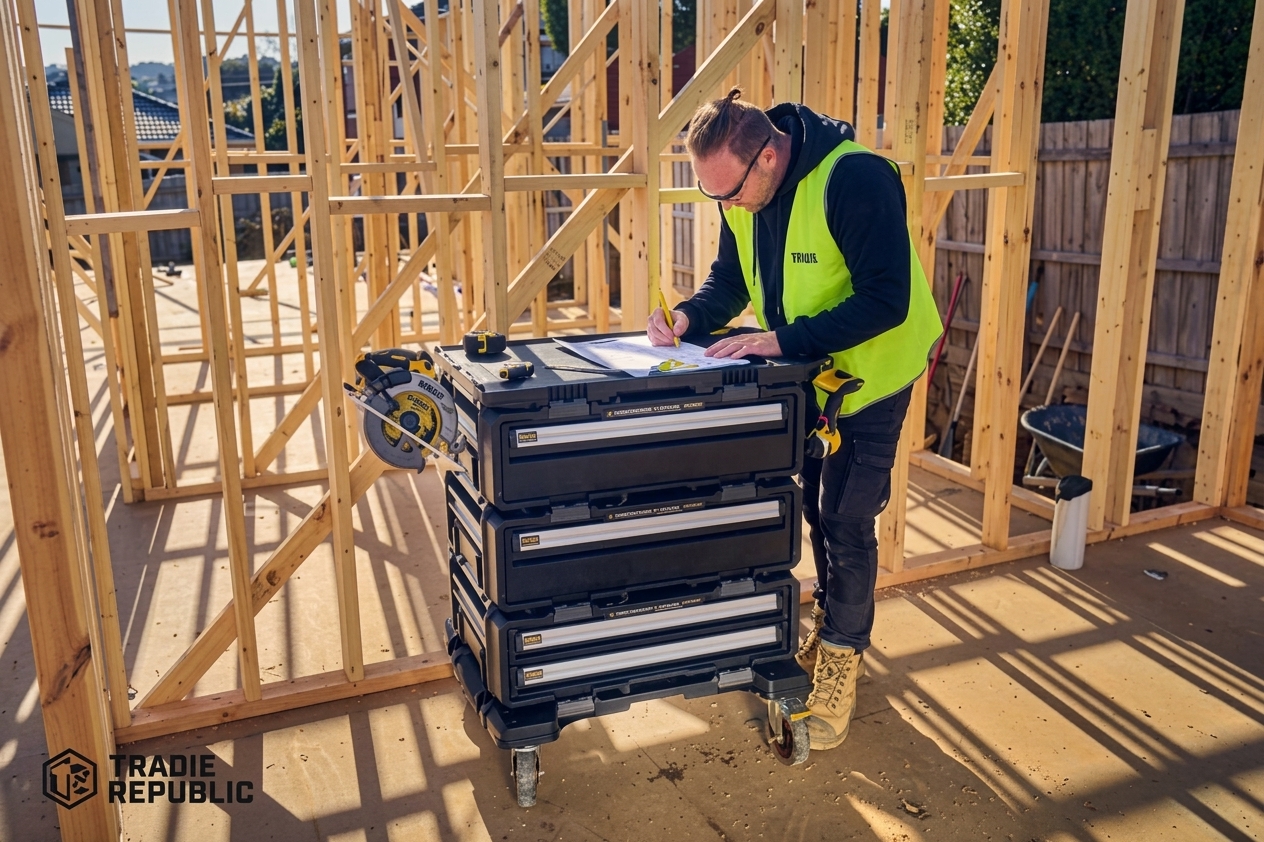
Dewalt dxl 5-in-1 tower is a modular rolling workstation from the TOUGHSYSTEM 2.0 family. Instead of functioning as one conventional toolbox, it combines several storage and work components into a single mobile setup.
DEWALT describes the system as a 30-inch modular workstation designed around five independent products. The configuration brings together a tough-terrain dolly, a 30-inch two-drawer unit, two deep drawer units, and a functional worktop.
That design makes the tower especially useful when your work requires frequent access to different types of tools.
For example, you can use:
- Upper drawers for hand tools and small accessories.
- Deep drawers for larger power tools.
- Side racks for frequently used equipment.
- The worktop for measurements, assembly, or temporary tool placement.
- The dolly for moving the complete setup around the jobsite.
How Does the 5-in-1 Design Work?
The main advantage of the DEWALT DXL 5-in-1 Tower is the way its individual modules work together.
Rather than forcing every tool into one large compartment, the system separates storage into different areas. This makes it easier to create a workflow based on the tools you use most often.
DEWALT says the DXL modules can connect and stack using its auto-connect front latches. The system is also designed to work with TOUGHSYSTEM 2.0 products, giving users additional options for expansion.
The five main components include:
- Tough-terrain dolly
- 30-inch two-drawer unit
- First deep drawer unit
- Second deep drawer unit
- Reinforced worktop
This arrangement creates a vertical storage system that keeps tools organized without requiring multiple separate carts.
Storage Capacity and Drawer Organization
Storage is one of the strongest reasons to choose the DEWALT DXL 5-in-1 Tower.
The tower provides four drawers, including two deeper drawers intended for larger equipment. That makes the system more flexible than a toolbox that relies almost entirely on shallow compartments.
The deep drawers can accommodate items such as:
- Cordless drills
- Impact drivers
- Sanders
- Grinders
- Hand tools
- Fasteners
- Electrical accessories
- Plumbing tools
- Measuring equipment
- Small jobsite equipment
You can further organize the drawers with removable dividers, tool trays, foam inserts, and other compatible TOUGHSYSTEM accessories.
Why drawer organization matters
A good storage system should reduce the time spent looking for tools.
Instead of placing every tool into one large box, you can create dedicated zones. For example, keep electrical tools in one drawer, fastening equipment in another, and everyday hand tools in the upper drawers.
That approach can make the workstation faster to use during repetitive jobs.
Tough-Terrain Mobility for Jobsites
A rolling workstation only helps if you can move it where you need it.
The DEWALT DXL 5-in-1 Tower uses large caster wheels designed to move across demanding jobsite surfaces. DEWALT specifically highlights the tough-terrain wheels as a feature for harsh environments.
This is useful when moving equipment across:
- Concrete floors
- Workshops
- Commercial construction sites
- Garages
- Remodeling projects
- Industrial spaces
- Uneven jobsite surfaces
The wheels also let you keep frequently needed tools together instead of repeatedly walking back to a truck or storage area.
A practical advantage
Imagine working in a large unfinished building. Rather than carrying several tool cases from one room to another, you can move the workstation as one unit.
That saves physical effort and keeps your primary tools together.
The Worktop Makes It More Than a Tool Cabinet
One feature that separates the DEWALT DXL 5-in-1 Tower from a standard rolling tool cabinet is its work surface.
The reinforced worktop gives you a dedicated area for small tasks. DEWALT also includes integrated screw holes that can be used to mount 2×4 material or integrate plywood for a larger task surface.
This can be useful for:
- Measuring materials
- Sorting hardware
- Preparing components
- Small assembly work
- Temporary cutting support
- Organizing parts during installation
- Keeping frequently used tools above the drawers
The separate DXL worktop is also rated by DEWALT for a total load capacity of up to 88 pounds, although users should follow the specifications for the exact component and configuration they own.
Tool Security and Drawer Protection
Jobsite security matters because expensive tools can disappear quickly when left unattended.
The DEWALT DXL 5-in-1 Tower includes a padlock-eye system and integrated metal bar designed to help secure the drawers. DEWALT also describes its drawers as having an automatic quick-latching mechanism.
The drawer slides use metal ball bearings to support smooth opening and closing.
This combination provides three useful benefits:
- Better drawer access
- More controlled storage
- An additional security option
However, a lockable tool cabinet should not be treated as a guarantee against theft. Use sensible jobsite security practices, especially when the workstation is left unattended.
Side Racks Provide Faster Tool Access
Not every tool belongs inside a drawer.
The DEWALT DXL 5-in-1 Tower includes side metal racks that provide quick access to selected power tools and accessories.
This is useful for tools you reach for repeatedly during a project.
Instead of opening a drawer every time, you can keep selected equipment on the side of the workstation.
Good candidates include:
- Cordless drills
- Impact drivers
- Frequently used accessories
- Small equipment
- Charging-related accessories
DEWALT lists a total side-rail load capacity of up to 12.5 kg on its UK and Irish product information, so avoid overloading the racks.
TOUGHSYSTEM 2.0 Compatibility
The modular nature of the DEWALT DXL 5-in-1 Tower is one of its biggest long-term advantages.
DEWALT states that the DXL workstation is compatible with TOUGHSYSTEM 2.0 products. That means users who already own compatible modules may be able to build a more personalized storage setup instead of replacing everything at once.
This is particularly useful for contractors who already use the TOUGHSYSTEM ecosystem.
You can build your storage around your actual workflow rather than choosing a fixed configuration that may become inconvenient later.
Is It Good for Contractors?
The DEWALT DXL 5-in-1 Tower makes the most sense for professionals who carry a large selection of tools and spend significant time working away from a traditional workshop.
It can suit:
- General contractors
- Remodelers
- Electricians
- Plumbers
- HVAC professionals
- Maintenance technicians
- Installers
- Workshop professionals
- Serious DIY users
The workstation is less compelling if you only own a small collection of hand tools.
A compact toolbox may be easier to transport for occasional home projects.
DEWALT DXL 5-in-1 Tower Pros and Cons
Pros
- Large modular storage capacity
- Four accessible drawers
- Two deep drawers for larger tools
- Rolling jobsite design
- Tough-terrain caster wheels
- Reinforced work surface
- Side tool racks
- Removable organization dividers
- Compatible with TOUGHSYSTEM 2.0
- Locking capability
- Modular configuration
- Suitable for professional jobsites
Cons
- Large footprint compared with a standard toolbox
- May be excessive for casual DIY users
- A fully loaded tower can become difficult to move
- Additional TOUGHSYSTEM accessories can increase total cost
- Large workstation format is not ideal for every vehicle or workspace
The biggest question is not whether the tower has useful features. It is whether you will actually use its capacity enough to justify its size and cost.
Who Should Buy the DXL 5-in-1 Tower?
You should consider the DEWALT DXL 5-in-1 Tower if your work demands organized, mobile access to a substantial tool collection.
It is particularly attractive when:
- You work on large jobsites.
- You carry many power tools.
- You want drawers instead of top-loading boxes.
- You need a mobile workstation.
- You already own TOUGHSYSTEM 2.0 products.
- You want a dedicated work surface.
- You frequently move tools between rooms or work areas.
It may not be the best choice if:
- You mainly use a few hand tools.
- You have limited storage space.
- You need something lightweight.
- You regularly transport tools in a small vehicle.
How to Organize the Tower Efficiently
Buying a large workstation does not automatically create good organization.
Use a simple system based on frequency of use.
Recommended setup
Top drawer:
Keep measuring tools, screwdrivers, pliers, utility knives, pencils, and other everyday items.
Second drawer:
Store bits, sockets, fasteners, small accessories, and consumables.
First deep drawer:
Use for drills, impact drivers, chargers, and other medium-to-large equipment.
Second deep drawer:
Reserve for larger power tools and less frequently used equipment.
Side racks:
Keep your most frequently accessed cordless tools or accessories.
Worktop:
Use the top for active tasks rather than long-term storage.
This arrangement keeps high-use tools close to your working position while moving bulky equipment into deeper storage.
How Does It Compare With a Traditional Tool Chest?
A traditional tool chest can provide excellent workshop storage, but it may not offer the same jobsite mobility.
The DEWALT DXL 5-in-1 Tower focuses on a different use case: taking organized storage and a work surface directly to the job.
| Feature | DXL 5-in-1 Tower | Traditional Tool Chest |
|---|---|---|
| Jobsite mobility | Excellent | Usually limited |
| Modular design | Yes | Usually no |
| Deep tool storage | Yes | Depends on model |
| Worktop | Yes | Depends on model |
| TOUGHSYSTEM compatibility | Yes | No |
| Side tool storage | Yes | Limited |
| Uneven-surface mobility | Designed for it | Varies |
| Workshop use | Excellent | Excellent |
| Jobsite use | Excellent | Moderate |
| Expansion | Modular | Usually fixed |
The right choice depends on where you work. For a fixed workshop, a large tool chest may make more sense. For mobile construction work, a modular rolling workstation can provide more practical flexibility.
Is the DXL 5-in-1 Tower Worth the Investment?
For the right user, yes.
The value comes from combining several functions in one system rather than simply providing another toolbox. You get storage, mobility, organization, security features, modular compatibility, and a work surface.
The strongest reason to buy it is convenience. If your current setup requires several toolboxes and repeated trips to your vehicle, consolidating your equipment can make daily work more efficient.
The weakest reason to buy it is simply wanting a bigger toolbox. If you do not need the additional capacity, the size and complexity may not provide enough practical benefit.
Final Verdict: Should You Buy It?
The DEWALT DXL 5-in-1 Tower is a capable choice for professionals who want a serious mobile tool-storage system rather than a basic rolling toolbox.
Its biggest strengths are the four-drawer configuration, deep storage, large wheels, modular TOUGHSYSTEM 2.0 compatibility, side racks, security features, and functional worktop. DEWALT’s official specifications confirm that the system is designed around these features.
Best for: contractors, tradespeople, service professionals, remodelers, and serious DIY users with substantial tool collections.
Skip it if: you need compact storage, carry only a few tools, or rarely work away from a fixed workshop.
If your current toolbox feels cramped and your tools constantly travel between the truck, workshop, and jobsite, this DXL workstation offers a much more organized approach.
Frequently Asked Questions
1. What is the DEWALT DXL 5-in-1 Tower?
It is a modular rolling workstation in the TOUGHSYSTEM 2.0 family. The system combines a dolly, drawer modules, and a worktop into one mobile tool-storage solution.
2. How many drawers does the DXL 5-in-1 Tower have?
The complete configuration has four drawers. It combines a 30-inch two-drawer unit with two additional deep drawer units.
3. Is the DXL 5-in-1 Tower compatible with TOUGHSYSTEM 2.0?
Yes. DEWALT states that the DXL workstation is compatible with TOUGHSYSTEM 2.0 products, allowing users to expand their storage system.
4. Can you lock the DXL tower?
Yes. The system includes a padlock-eye and integrated metal bar designed to help secure the drawers.
5. Is the DXL tower good for jobsites?
Yes. Its large caster wheels, mobile design, drawer storage, side racks, and work surface make it particularly suitable for construction and service environments.
6. Does the DXL tower include a worktop?
Yes. The five-part configuration includes a functional worktop. DEWALT also provides a separate DXL worktop component with integrated features for expanding the working surface.